
Would rather have this checked on your site for you? See AI search and GEO consultancy.
As AI-powered search engines like ChatGPT, Perplexity, and Google’s AI Overviews continue to shape how people search, shop, and discover online, it is becoming increasingly important to understand how your website appears to their bots.
Unlike human users, AI models and lightweight crawlers do not always see your site as your visitors do. Some key sections, especially those loaded dynamically through JavaScript, may not be included in the static HTML that search engines and AI models rely on.
Here is a simple and reliable way to check what content is visible to AI systems and crawlers and how to fix it if important parts are missing.
Step 1: Understand How AI Models "See" Your Site
Most large language models, including ChatGPT, Perplexity, Claude, and Gemini, do not execute JavaScript. Instead, they rely on the static HTML version of your site, which is either:
- Crawled directly by the model’s indexing partners, or
- Pulled from publicly available snapshots of your pages
That means if your important content (text, pricing, calls-to-action, or reviews) only appears after JavaScript runs, there is a chance it will not be visible to LLMs or to lightweight bots used for AI search.
Most consumer-facing LLMs like ChatGPT either use the content gathered from past web crawls (their training corpus) or fetch real-time data via Retrieval-Augmented Generation (RAG) from search engines like Google or Bing. Therefore, ensuring your content is visible to Googlebot and Bingbot remains the single most effective way to make it retrievable by AI systems. In short: if search crawlers can’t see it, neither can AI.
Step 2: Use the "Disable JavaScript" Test as a Quick Indicator
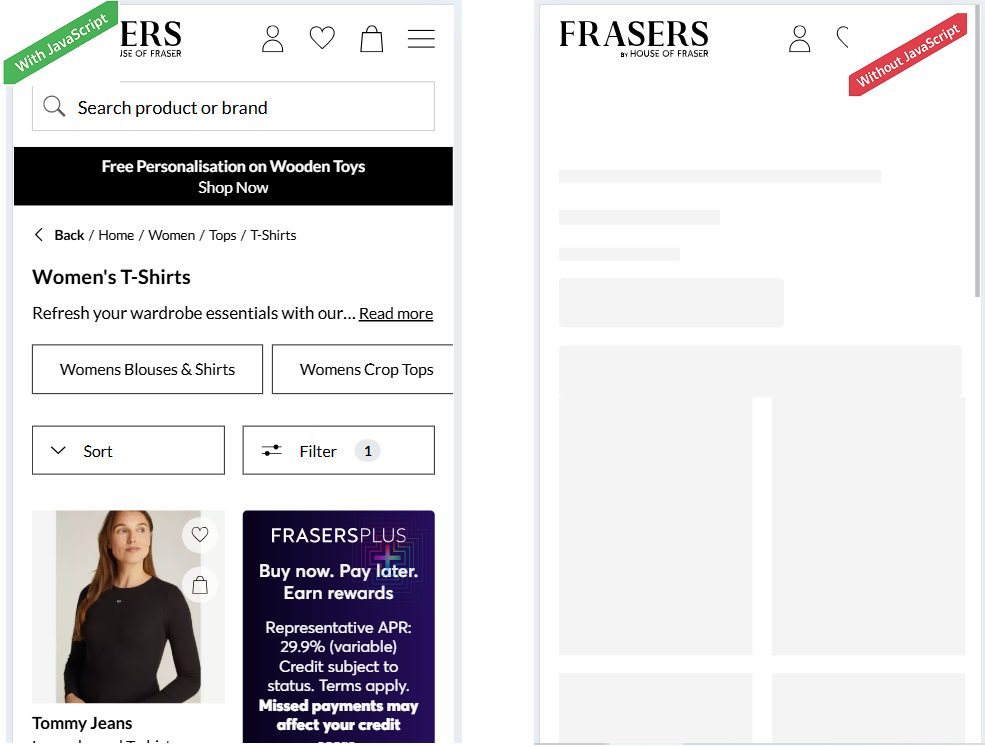
Here is a quick way to spot whether your site relies too heavily on JavaScript for key content:
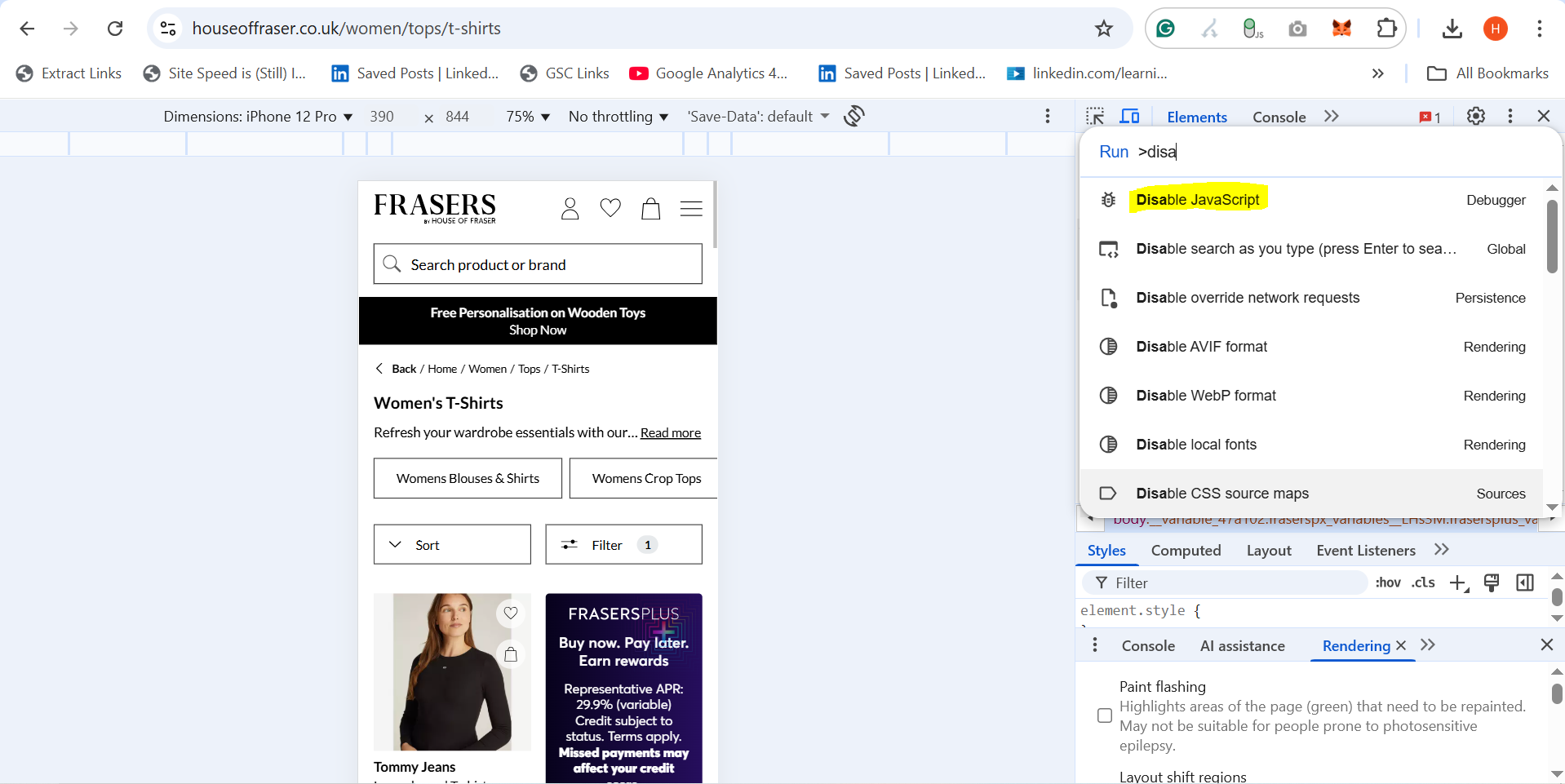
- Open your webpage in Chrome.
- Right-click and select Inspect.
- Press Cmd + Shift + P (Mac) or Ctrl + Shift + P (Windows).
- Type "Disable JavaScript" and press Enter.
- Refresh the page and observe what changes.
If certain content, such as product descriptions, pricing tables, or text sections, disappears, it is a sign that those elements are loaded client-side via JavaScript.
It’s a common misconception that this prevents AI models from seeing the content; in reality, it only indicates that those elements may not be present in the page’s static HTML.
Step 3: Check What is in the Final HTML Output
To confirm what is actually visible to crawlers and LLMs, you’ll want to inspect the rendered HTML output - not just what you see in your browser.
There are a few ways to do this:
Option 1: View Page Source
- Right-click anywhere on the page and select “View Page Source.”
- Use Ctrl + F (or Cmd + F) to search for key pieces of text - product names, pricing, reviews, or CTAs.
- If the text is not in the source code, it is likely being added by JavaScript after the page loads.
Option 2: Use Google’s Rich Results Test
- Go to Google’s Rich Results Test.
- Enter your URL and click “Test URL.”
- Once loaded, click “View Tested Page” → “HTML” to see the final rendered output.
- This shows exactly what Google’s crawler sees after executing JavaScript.
If all of the content, even after executing JavaScript files, can be/is indexed in Google, then LLMs can access it through RAG. This connection between Google indexing and AI retrieval (RAG) is critical. If Google can crawl and store it, AI models can typically retrieve it.
Option 3: Crawl with Screaming Frog (or Sitebulb)
- Enable JavaScript rendering in your crawler settings.
- Crawl the same set of URLs twice - once with JS enabled and once without.
- Compare the HTML word count and key content between the versions.
- Large differences often point to content being injected dynamically.
Step 4: Check Robots.txt, Meta Directives & AI Crawlers
Even if your content is perfectly rendered, it won’t be seen if it’s blocked from crawling.
Robots.txt: Make sure your robots.txt or firewall doesn’t block modern AI crawlers like GPTBot, PerplexityBot, or ClaudeBot.
-
User-agent: GPTBot(OpenAI / ChatGPT) -
User-agent: PerplexityBot -
User-agent: ClaudeBot(Anthropic) -
User-agent: Google-Extended(controls whether Google’s AI models can use your content)
Meta Directives: Use meta tags carefully to control visibility and usage:
-
<meta name="robots" content="noindex">prevents indexing. -
<meta name="robots" content="nosnippet">or data-nosnippet stops text from being used in snippets or AI overviews. -
<meta name="google-extended" content="nosnippet">controls use in Google’s generative AI.
These directives now play a key role in how AI systems access and reuse your content. Always align them with your visibility and copyright policies.
Step 5: Audit High-Risk Sections
Certain parts of websites are more likely to be JavaScript-dependent. Review these first:
- Product detail pages (PDPs) – especially price, size, or review sections
- Category pages (PLPs) – filters, pagination, or product grids
- Blog Posts – dynamic tables of contents or related articles
- If these rely on client-side rendering, they might not appear in static HTML or to LLMs.
Also watch for API-fed content.
Modern websites often fetch key data (stock levels, product options, pricing, or availability) via APIs after the page loads. If this content is critical for visibility or user understanding, make sure it is server-side rendered (SSR) or pre-rendered before the HTML is delivered.
Step 6: Ensure Key Content Is Available in Static HTML
To make your content visible to both search engines and AI models, use one of these approaches:
- Server-Side Rendering (SSR) Render your pages on the server before they’re delivered to the browser. Frameworks like Next.js or Nuxt make this easy.
- Pre-Rendering or Static Generation Generate HTML versions of your pages ahead of time using tools like Rendertron, Prerender.io, or Gatsby.
- Progressive Enhancement Keep core text, images, and metadata in the base HTML, and use JavaScript only for visual or interactive enhancements.
- Fallback Content If certain elements must load via JavaScript, include fallback HTML text so search engines and AI crawlers still have something to index.
Step 7: Verify Indexing
Once you’ve implemented server-side rendering or prerendering, confirm that your content is being indexed correctly:
- Search Google using site:yourdomain.com "snippet of your text"
- Check the Indexing section in Google Search Console
- Use the URL Inspection Tool to view what Google actually crawled
If your content appears in these results, it’s successfully visible to crawlers — and, by extension, to AI systems that rely on this data.
Step 8: Monitor AI Visibility and Citations
Once your technical rendering and indexing are correct, measure whether your site is actually being seen and cited in AI environments.
- Track citations: Use tools like Profound, Peec.ai, Waikay, Ahrefs Brand Radar, etc, to see where your domain appears within ChatGPT, Perplexity, or Claude results.
- Measure AI referral traffic: In GA4, create a custom “AI Agents” channel to track visits from chat.openai.com, perplexity.ai, and others.
- Prompt-Based Testing: Run prompts in ChatGPT, Perplexity, Gemini, or Claude related to your products or topics (e.g., “best men’s designer sneakers” or “what to wear to a beach wedding”) to see if your site is cited or mentioned.
- Server Log Analysis: Use tools like Botify, Screaming Frog Log File Analyser or other enterprise crawlers to verify if AI bots (GPTBot, ClaudeBot, etc.) are actually crawling your pages.
Step 9: Repeat Regularly
Websites evolve quickly, and so do JavaScript frameworks. It is good practice to:
- Audit key templates (homepage, PLP, PDP, blog) every quarter.
- Test new features or components with JS disabled before launch.
- Re-crawl using tools that compare raw vs rendered HTML.
This ensures your visibility remains consistent across both traditional search engines and AI-driven discovery platforms.
In Summary:
AI models read your HTML, not your JavaScript. Check how your site renders without JS, confirm key content appears in the static HTML using tools like Google’s Rich Results Test or Screaming Frog, and verify indexing in Search Console. If your core messages and CTAs live in the HTML, you’ll stay visible across search and AI platforms.
Then go beyond rendering:
- Make sure bots are allowed to crawl your site.
- Add structured data to help AI interpret and attribute content.
- Track AI citations and referral traffic to measure visibility impact.
If your core content and CTAs live in the HTML and you maintain crawl access and structured visibility, you’ll stay discoverable across both search engines and AI platforms.