
Contents
A 429 Too Many Requests error on Shopify means that Shopify has temporarily rate-limited an app, script, crawler or visitor because too many requests were made within a particular period.
The error is common during technical SEO crawls with tools such as Screaming Frog, Ahrefs or Sitebulb. It can also be caused by an app repeatedly calling an API, a looping theme script, excessive predictive-search requests or rapid cart activity.
I encountered this while crawling a Shopify store with Screaming Frog. The crawl initially worked, but after approximately 120 URLs, almost every subsequent product and blog URL returned a 429 response—even with the crawl restricted to one thread and one URL per second.
 Screaming Frog returning a series of 429 Too Many Requests responses during a Shopify crawl.
 The crawl was limited to one thread and one URL per second, but Shopify still rate-limited the crawler.
What Does 429 Too Many Requests Mean on Shopify?
A 429 response means Shopify has temporarily throttled requests because a rate limit was reached. It may be triggered by an SEO crawler, Shopify app, API integration, theme script or automated bot.
How to Fix Shopify 429 Errors in Screaming Frog
Reducing crawl speed may help, but Shopify can still restrict an unidentified crawler. For Shopify websites, the preferred solution is to authenticate Screaming Frog using Shopify's crawler-access headers.
Preferred Fix: Use Shopify Crawler Access
Shopify allows store owners to create a signature that authenticates an approved crawler. The signature is associated with a specific connected domain and is added to the crawler's HTTP request headers.
The signature applies to the selected public storefront domain and does not provide access to Shopify Checkout.
Step 1: Create a Crawler Signature in Shopify
Log in to Shopify Admin and go to:
Scroll to the Crawler access section and:
- Click Create signature.
- Enter a descriptive name, such as Screaming Frog SEO Audit.
- Select the connected domain you intend to crawl.
- Choose how long the signature should remain valid.
- Click Create.
- Copy the values provided by Shopify.
A signature expires automatically and cannot be renewed. Once it expires, create a new signature and update the headers in your crawling tool.

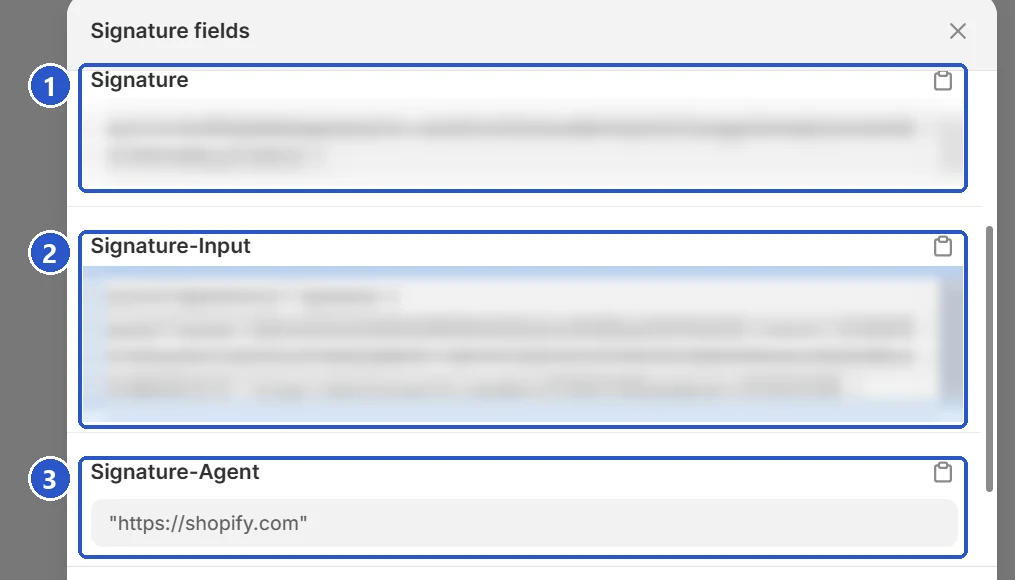 Shopify hands you three values: (1) Signature, (2) Signature-Input and (3) Signature-Agent. Copy each one in full. The first two are blurred here because they are unique to a store and work like a key.
Step 2: Add the Shopify Headers to Screaming Frog
In Screaming Frog, open:
In some versions, this may appear under:
Add the following as three separate entries:
| Header name | Header value |
|---|---|
Signature-Input
|
Paste the complete Signature-Input value generated by Shopify. |
Signature
|
Paste the complete Signature value generated by Shopify. |
Signature-Agent
|
"https://shopify.com"
|
Signature-Agent value belongs in the HTTP Header list only. Screaming Frog sets the user agent on its own screen, which is what the greyed User-Agent row on the HTTP Header screen is telling you: it is not a field to fill in. Keep Crawl Config → User-Agent on the Screaming Frog SEO Spider preset.
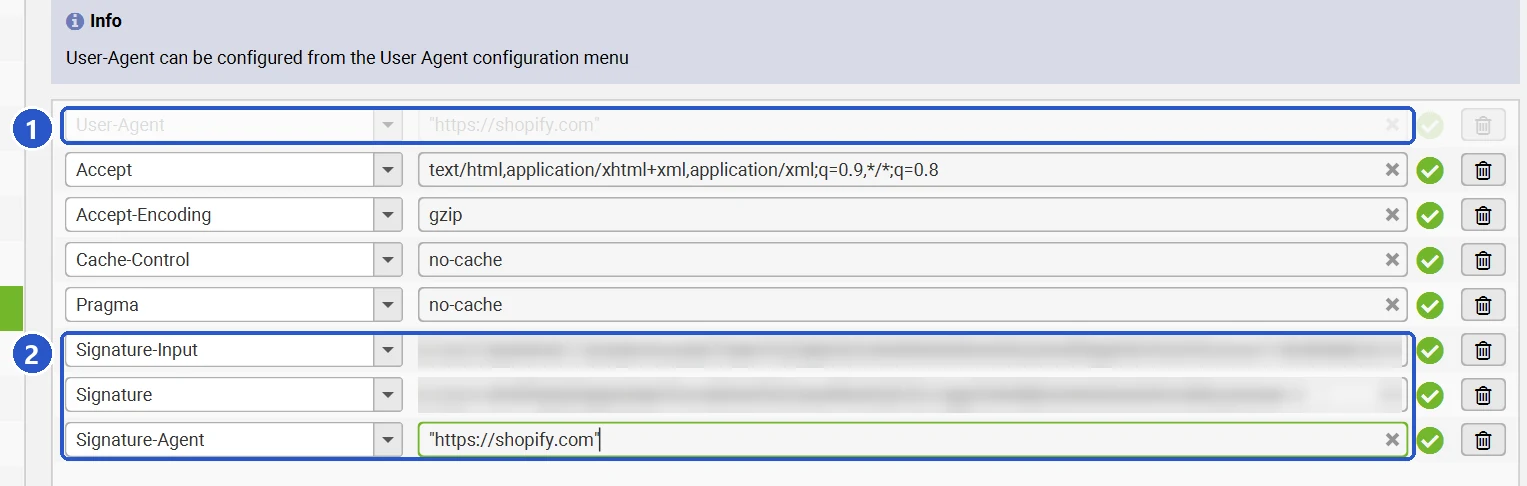 The HTTP Header screen: (1) the greyed User-Agent row, which Screaming Frog fills from its own User-Agent screen, and (2) the three Shopify headers as separate rows. The signature values are blurred.
 (1) Crawl Config → User-Agent stays on the Screaming Frog SEO Spider preset. Nothing from Shopify goes here.
Make sure that:
- All three required headers have been added.
- The Signature-Input and Signature values have been copied in full.
- No accidental spaces or extra characters have been introduced.
- The Signature-Agent value does not include a trailing slash.
- The signature was created for the exact domain being crawled.
- The signature has not expired.
-
The User-Agent screen still uses the Screaming Frog preset, and the
Signature-Agentvalue appears only once, in the HTTP Header list.
Re-Crawl the Affected URLs
Save the configuration and allow time for the authentication to propagate. Screaming Frog notes that this may take between 30 minutes and one hour when the IP address has already been throttled.
Resume the crawl or filter the existing crawl to 429 responses, select the affected URLs and choose Re-Spider. Confirm that they now return the expected 200 or redirect responses.
Do not rely on the original SEO data for URLs that returned 429 because Screaming Frog could not properly analyse their titles, canonicals, headings, structured data, indexability, internal links or content.
Fallback Fix: Reduce the Crawl Speed
If you cannot access Shopify Admin, use the following Screaming Frog settings:
At 0.2 URLs per second, Screaming Frog sends approximately one request every five seconds. The crawl will be slower, but the reduced request rate may prevent further throttling.
Exclude Unnecessary Shopify Variant URLs
Shopify product links may contain a ?variant= parameter. Crawling every variant can significantly increase the number of requests sent to Shopify.
If variant URLs are outside the scope of the audit, add the following under Configuration → Exclude:
Do not exclude them when you need to review variant-specific internal links, canonicals or indexation behaviour.
Shopify 429 Errors Affecting an App or API
If a Shopify app or API integration receives the 429 response, it must respect Shopify's rate-limit information rather than immediately retrying the request.
- Respect Retry-After: Wait for the period specified in the response before retrying.
- Use controlled retries: Increase the delay after repeated failures.
- Monitor GraphQL query cost: Read the cost and throttle status returned by Shopify.
- Queue large jobs: Avoid processing thousands of records in one uncontrolled loop.
- Reduce concurrency: Use smaller batches and fewer simultaneous workers.
- Use bulk operations: Use Shopify's bulk-operation functionality for large datasets where appropriate.
What If Customers See 429 Errors?
If genuine customers receive the error, inspect the browser's Network panel for repeated requests to endpoints such as /cart.js, /cart/add.js or /search/suggest.
Common causes include looping theme scripts, duplicate event listeners, repeated AJAX requests and third-party search, filtering, recommendation or cart apps.
Disable recently added apps one at a time and test a clean or backup theme. Also prevent repeated button clicks while a request is processing and debounce predictive-search requests so they are sent only after the customer briefly stops typing.
Does a Shopify 429 Error Affect SEO?
A temporary 429 during your own Screaming Frog crawl does not prove that Googlebot is receiving the same response. However, persistent rate limiting affecting legitimate search-engine crawlers could reduce crawl efficiency.
For an SEO audit, the immediate issue is data reliability. A URL that returned 429 has not been properly assessed for titles, canonicals, headings, meta robots directives, structured data, internal links, content, or redirect behaviour.
Resolve the rate-limit issue and re-crawl the affected URLs before concluding the audit.
Frequently Asked Questions
Why does Screaming Frog get 429 errors on Shopify?
Shopify may apply stricter rate limits to unidentified automated crawlers. Creating a Shopify crawler signature allows Screaming Frog to authenticate its storefront requests.
Will reducing the crawl to one URL per second fix it?
Not always. Shopify may continue throttling the crawler even at one thread and one URL per second. Crawler authentication is the preferred solution.
Is a Shopify 429 error caused by robots.txt?
No. Robots.txt provides crawling instructions, while a 429 response means Shopify has temporarily rate-limited the request.
How long does a Shopify crawler signature last?
The expiry period is selected when the signature is created. Once it expires, create a new signature and update the crawler headers.
Final Thoughts
A Shopify 429 error does not necessarily indicate a broken or blocked URL. For Screaming Frog crawls, Shopify's Crawler access signature is the preferred fix. Slower crawling, a Chrome user agent and excluding unnecessary variant URLs are useful fallbacks when Shopify Admin access is unavailable.
Related SEO Guides
Sources
- Shopify Help Centre: Crawling your store
- Screaming Frog SEO Spider FAQ
- Screaming Frog: HTTP status codes when crawling
- Shopify API limits
- Shopify REST Admin API rate limits
Need help diagnosing Shopify crawling, indexation or other technical SEO problems? I provide practical technical SEO audits for ecommerce websites. Contact me to discuss your website.